[av_codeblock wrapper_element=” wrapper_element_attributes=” codeblock_type=” av_uid=’av-kld530c3′ custom_class=’cust-codeblock-ads1 mb-small’]


[/av_codeblock]

[av_textblock size='' font_color='' color='' av-medium-font-size='' av-small-font-size='' av-mini-font-size='' av_uid='av-zrutke' custom_class='' admin_preview_bg='']
[av_breadcrumbs]
[/av_textblock]

[av_one_half first min_height='av-equal-height-column' vertical_alignment='av-align-middle' space='no_margin' custom_margin='aviaTBcustom_margin' margin='0px,50px' padding='0px' padding_sync='true' border='' border_color='' radius='0px' radius_sync='true' background_color='' src='' attachment='' attachment_size='' background_position='top left' background_repeat='no-repeat' animation='' mobile_display='' av_uid='av-vr278u']
[av_image src='https://gestudio.dev/wp-content/uploads/2018/11/Integrate-AdminLTE-In-Laravel-Complete-Guide-01.png' attachment='5069' attachment_size='full' align='center' styling='no-styling' hover='' link='' target='' caption='' font_size='' appearance='' overlay_opacity='0.4' overlay_color='#000000' overlay_text_color='#ffffff' copyright='' animation='no-animation' av_uid='av-v92p26' custom_class='' admin_preview_bg=''][/av_image]
[/av_one_half]

[av_one_half min_height='' vertical_alignment='' space='' custom_margin='' margin='0px' padding='0px' border='' border_color='' radius='0px' background_color='' src='' background_position='top left' background_repeat='no-repeat' animation='' mobile_display='' av_uid='av-2w2v6m']
[av_image src='https://gestudio.dev/wp-content/uploads/2020/11/scriptwriterph-technical-support-1.png' attachment='5957' attachment_size='full' align='center' styling='no-styling' hover='' link='page,3483' target='' caption='' font_size='' appearance='' overlay_opacity='0.4' overlay_color='#000000' overlay_text_color='#ffffff' copyright='' animation='no-animation' av_uid='av-rfacj2' custom_class='' admin_preview_bg=''][/av_image]
[/av_one_half]

[av_textblock size='' font_color='' color='' av-medium-font-size='' av-small-font-size='' av-mini-font-size='' av_uid='av-q9v7z2' custom_class='' admin_preview_bg='']

Integrate AdminLTE in Laravel Complete Guide

[wpb_last_updated_date]

This’s a complete guide to integrate AdminLTE in Laravel. A big help for web developers like me that is not a (pro) front-end developer. This is for you if you want a responsive web app template and you don’t want to start from scratch. Thanks to AdminLTE, a popular open-source web app template that will help you create interfaces such as admin dashboards and control panels.

Steps to Integrate AdminLTE in Laravel

This is a two-step guide with sub-steps that will walk you through to install Laravel using Composer and integrate AdminLTE in Laravel.

The following steps use the Composer dependency management to easily integrate AdminLTE in Laravel.

[av_hr class=’invisible’ height=’25’ shadow=’no-shadow’ position=’center’ custom_border=’av-border-thin’ custom_width=’50px’ custom_border_color=” custom_margin_top=’30px’ custom_margin_bottom=’30px’ icon_select=’yes’ custom_icon_color=” icon=’ue808′ font=’entypo-fontello’ admin_preview_bg=” av_uid=’av-njp21a’]

Step 1: Install Laravel Using Composer

Before we integrate AdminLTE in Laravel, we first need to install Laravel on our server. Remember that Laravel framework has few system requirements. If you’re not using Laravel Homestead then you need to make sure that the following has already installed on your server.

  • PHP >= 7.1.3. Open a terminal and check your PHP version by typing php -v command.

php -v check php version

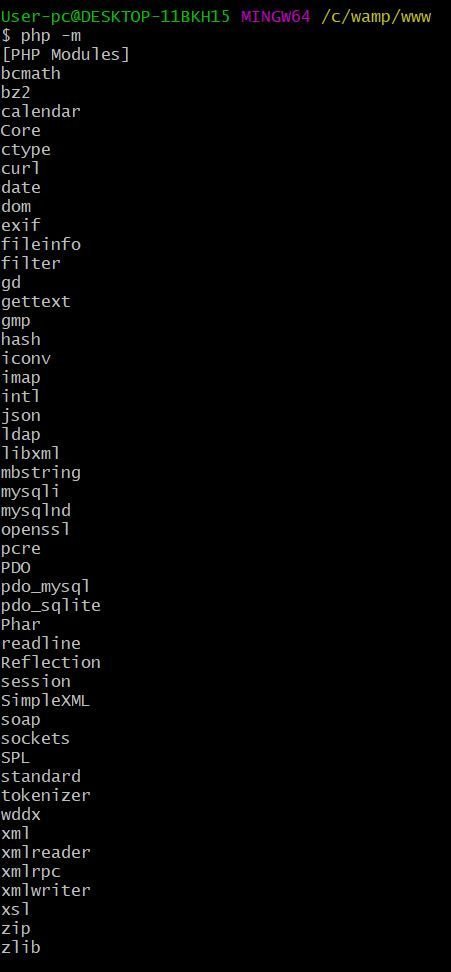
  • PHP extensions required are OpenSSL, PDO, Mbstring, Tokenizer, XML, Ctype and JSON. Type php -m command to list all PHP extensions.

php -m check php modules

a. From your terminal, navigate to directory where you want to install Laravel.
[/av_textblock]

[av_codeblock wrapper_element=” wrapper_element_attributes=” codeblock_type=” av_uid=’av-kld530c3′ custom_class=’cust-codeblock-ads1′]


[/av_codeblock]

[av_textblock size=” font_color=” color=” av-medium-font-size=” av-small-font-size=” av-mini-font-size=” av_uid=’av-q9v7z2′ custom_class=” admin_preview_bg=”]
b. Create your Laravel project using the composer create-project –prefer-dist laravel/laravel command. Composer will install all Laravel’s necessary files.
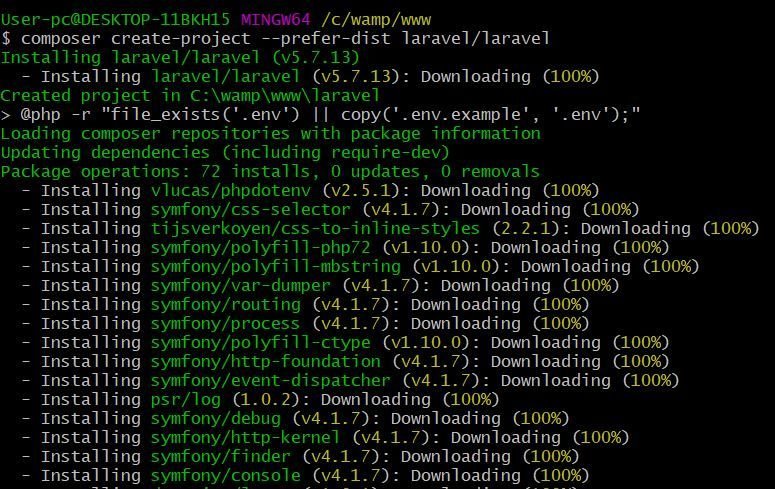
composer-create-project --prefer-dist laravel-laravel create laravel project using composer

Installation should end with a message Application key set successfully.
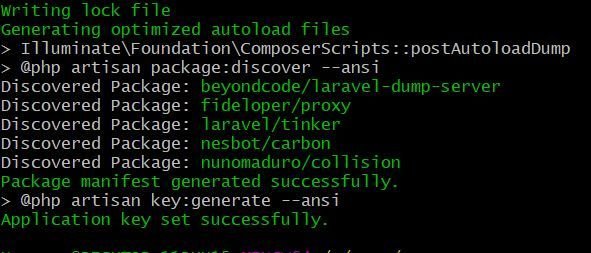
composer-create-project --prefer-dist laravel-laravel create laravel project using composer successful

Open a browser and navigate to your project URL.
[/av_textblock]

[av_codeblock wrapper_element=” wrapper_element_attributes=” codeblock_type=” av_uid=’av-k4pav513′ custom_class=”]

[/av_codeblock]

[av_textblock size=” font_color=” color=” av-medium-font-size=” av-small-font-size=” av-mini-font-size=” av_uid=’av-k4pao4xi’ custom_class=” admin_preview_bg=”]
If the page displays Index of Laravel instead of Laravel’s welcome page then perform the following.

If you have PHP installed on your server to serve your project then you can start your Laravel project by executing php artisan serve command; Else just move index.php and .htaccess file from your public folder to project main folder.

Laravel and PHPMailer move index and htaccess to project main folder

Open index.php and replace require __DIR__.’/../vendor/autoload.php’; with require __DIR__.’/vendor/autoload.php’; and $app = require_once __DIR__.’/../bootstrap/app.php’; with $app = require_once __DIR__.’/bootstrap/app.php’;

Save and close the file. Go to your browser and reload your page. Now, you should see Laravel’s welcome page.

laravel welcome page

[av_hr class=’invisible’ height=’25’ shadow=’no-shadow’ position=’center’ custom_border=’av-border-thin’ custom_width=’50px’ custom_border_color=” custom_margin_top=’30px’ custom_margin_bottom=’30px’ icon_select=’yes’ custom_icon_color=” icon=’ue808′ font=’entypo-fontello’ admin_preview_bg=” av_uid=’av-m7edfy’]
[/av_textblock]

[av_textblock size=” font_color=” color=” av-medium-font-size=” av-small-font-size=” av-mini-font-size=” av_uid=’av-kyacxq’ custom_class=” admin_preview_bg=”]

Step 2: Integrate AdminLTE in Laravel Using Composer

a. From your terminal, type the command composer require jeroennoten/laravel-adminlte to easily download AdminLTE necessary files.

integrate adminlte in laravel composer require jeroennoten-laravel-adminlte

b. Open config/app.php and add this line to Service Providers.
JeroenNotenLaravelAdminLteServiceProvider::class,

integrate adminlte in laravel config-app.php add providers

c. Run php artisan vendor:publish –provider=”JeroenNoten\LaravelAdminLte\ServiceProvider” –tag=assets command to publish your public assets.

integrate adminlte in laravel php artisan vendor publish --provider=JeroenNoten-LaravelAdminLte-ServiceProvider --tag=assets

d. Run composer update jeroennoten/laravel-adminlte command to update AdminLTE package.

e. Run php artisan vendor:publish –provider=”JeroenNotenLaravelAdminLteServiceProvider” –tag=assets –force command to overwrite existing files.

integrate adminlte in laravel php artisan vendor publish --provider= JeroenNoten-LaravelAdminLte-ServiceProvider --tag=assets --force

Good Job! You’ve integrated AdminLTE in Laravel successfully. To appreciate AdminLTE’s admin panel beautiful design you may install Laravel’s authentication package.

[av_hr class=’invisible’ height=’25’ shadow=’no-shadow’ position=’center’ custom_border=’av-border-thin’ custom_width=’50px’ custom_border_color=” custom_margin_top=’30px’ custom_margin_bottom=’30px’ icon_select=’yes’ custom_icon_color=” icon=’ue808′ font=’entypo-fontello’ admin_preview_bg=” av_uid=’av-ifqyz2′]
[/av_textblock]

[av_textblock size=” font_color=” color=” av-medium-font-size=” av-small-font-size=” av-mini-font-size=” av_uid=’av-hxmblq’ custom_class=” admin_preview_bg=”]

Step 3: Install Laravel’s Authentication Package

This step is optional.

a. Run php artisan make:adminlte command to easily download Laravel’s authentication package. It is same as make:auth but uses the AdminLTE template.

integrate adminlte in laravel php artisan make-adminlte

b. Run php artisan vendor:publish –provider=”JeroenNotenLaravelAdminLteServiceProvider” –tag=config command to publish the configuration file.

integrate adminlte in laravel php artisan vendor publish --provider= JeroenNoten-LaravelAdminLte ServiceProvider --tag=config

You can now edit config/adminlte.php to configure your logo, skin, layout, sidebar, menu, and many more.

Go to your browser and reload your page. Now, you should see Laravel’s login page.

[av_hr class=’invisible’ height=’25’ shadow=’no-shadow’ position=’center’ custom_border=’av-border-thin’ custom_width=’50px’ custom_border_color=” custom_margin_top=’30px’ custom_margin_bottom=’30px’ icon_select=’yes’ custom_icon_color=” icon=’ue808′ font=’entypo-fontello’ admin_preview_bg=” av_uid=’av-ghroj2′]
[/av_textblock]

[av_textblock size=” font_color=” color=” av-medium-font-size=” av-small-font-size=” av-mini-font-size=” av_uid=’av-e6yxfi’ custom_class=” admin_preview_bg=”]

Common Issues When Trying to Integrate AdminLTE in Laravel

[av_hr class=’invisible’ height=’5′ shadow=’no-shadow’ position=’center’ custom_border=’av-border-thin’ custom_width=’50px’ custom_border_color=” custom_margin_top=’30px’ custom_margin_bottom=’30px’ icon_select=’yes’ custom_icon_color=” icon=’ue808′ font=’entypo-fontello’ admin_preview_bg=” av_uid=’av-c7lhfi’]

AdminLTE CSS Path Not Working

Google Dev Tools throws an error Failed to load resource: the server responded with a status of 404 error for some css resources.
[/av_textblock]

[av_codeblock wrapper_element=” wrapper_element_attributes=” codeblock_type=” av_uid=’av-k4pav513′ custom_class=”]


[/av_codeblock]

[av_textblock size=” font_color=” color=” av-medium-font-size=” av-small-font-size=” av-mini-font-size=” av_uid=’av-e6yxfi’ custom_class=” admin_preview_bg=”]

Fix the issue by appending public/ to all assets URL. Here’s the list of files to update.

  • views/auth/passwords/master.blade.php
  • views/auth/passwords/login.blade.php
  • views/auth/login.blade.php
  • views/auth/register.blade.php
  • views/auth/verify.blade.php

PHP Artisan Migrate Error

After running php artisan migrate command it throws an error Syntax error or access violation: 1071 Specified key was too long; max key length is 1000 bytes.

To fix the issue you have to edit app/Providers/AppServiceProvider.php file. Inside boot function set a default string length by adding this line Schema::defaultStringLength(191);. Now boot function should look like this.
[/av_textblock]

[av_codeblock wrapper_element=’pre’ wrapper_element_attributes=” escape_html=’aviaTBescape_html’ deactivate_shortcode=’aviaTBdeactivate_shortcode’ deactivate_wrapper=’aviaTBdeactivate_wrapper’ av_uid=’av-ax3yim’]
public function boot()
{
Schema::defaultStringLength(191);
}
[/av_codeblock]

[av_textblock size=” font_color=” color=” av-medium-font-size=” av-small-font-size=” av-mini-font-size=” av_uid=’av-9re45q’ custom_class=” admin_preview_bg=”]
We hope this topic on integrating AdminLTE in Laravel helped you create your responsive web app without starting from scratch.

If you want to develop your Laravel app as a single-page application (SPA) where you can perform CRUD (create, read, update, delete) operation, follow our guide here on Laravel Vue JS CRUD SPA (Single-Page Application) tutorial.
[/av_textblock]

[av_hr class=’default’ height=’50’ shadow=’no-shadow’ position=’center’ custom_border=’av-border-thin’ custom_width=’50px’ custom_border_color=” custom_margin_top=’30px’ custom_margin_bottom=’30px’ icon_select=’yes’ custom_icon_color=” icon=’ue808′ av_uid=’av-7wr2f2′]

[av_social_share title=’SHARE THIS POST’ style=’minimal’ buttons=” admin_preview_bg=” av_uid=’av-5a7n9q’]

[av_hr class=’invisible’ height=’50’ shadow=’no-shadow’ position=’center’ custom_border=’av-border-thin’ custom_width=’50px’ custom_border_color=” custom_margin_top=’30px’ custom_margin_bottom=’30px’ icon_select=’yes’ custom_icon_color=” icon=’ue808′ font=’entypo-fontello’ admin_preview_bg=” av_uid=’av-453ny6′]

[av_comments_list av_uid=’av-33zpta’]